Advanced File Processing
Purpose: |
Copy or upload a list of files to a connection. Files will be copied to the connection's current directory. The fmCopyTo action can be used if you want to initiate a file copy or upload programmatically without interaction from the user. (See fmCopyFrom to download files from a remote connection.) |
||||
Category: |
Advanced File Processing |
||||
Syntax: |
fmCopyTo "connection id" "files" "options" connection id The name assigned to the connection you want to copy the files to. The connection must have already been opened with fmConnectLocal or fmConnectRemote. files A list of local file names to be copied or uploaded. Separate multiple file names with a semicolon (;). Each file name must point to a local file and include a fully qualified path. options This is a compound parameter and can contain any combination of the following items:
Separate multiple items in a compound parameter with semicolons (;). |
||||
Example: |
fmCopyTo "Local1" "C:\Test\Sales.doc;C:\Test\Inventory.doc" "GetConfirmation=Yes;ShowProgress=Yes" |
Purpose: |
Move a list of files to a connection. Files will be moved to the connection's current directory. The fmMoveTo action can be used if you want to initiate a file move programmatically without interaction from the user. IMPORTANT: Moving of files is not supported for remote/FTP connections. If the destination is a remote connection, fmMoveTo will copy the files instead. |
||||
Category: |
Advanced File Processing |
||||
Syntax: |
fmMoveTo "connection id" "files" "options" connection id The name assigned to the connection you want to move the files to. The connection must have already been opened with fmConnectLocal. files A list of local file names to be moved. Separate multiple file names with a semicolon (;). Each file name must point to a local file and include a fully qualified path. options This is a compound parameter and can contain any combination of the following items:
Separate multiple items in a compound parameter with semicolons (;). |
||||
Example: |
fmMoveTo "Local1" "C:\Test\Sales.doc;C:\Test\Inventory.doc" "GetConfirmation=Yes;ShowProgress=Yes" |
Purpose: |
Copy or download a list of files from a connection to a local folder. The fmCopyfrom action can be used if you want to initiate a file copy or download programmatically without interaction from the user. (See fmCopyTo to upload files to a remote connection.) |
||||||
Category: |
Advanced File Processing |
||||||
Syntax: |
fmCopyFrom "connection id" "files" "dest path" "options" connection id The name assigned to the connection containing the files you want to copy or download. The connection must have already been opened with fmConnectLocal or fmConnectRemote. files A list of file names to be copied or uploaded. Separate multiple file names with a semicolon (;). Each file name must include a fully qualified path. dest path The local path where the files will be copied. options This is a compound parameter and can contain any combination of the following items:
Separate multiple items in a compound parameter with semicolons (;). |
||||||
Example: |
fmCopyFrom "Remote1" "/webspace/httpdocs/index.html;/webspace/httpdocs/logo.jpg" "C:\Downloads" "GetConfirmation=No;ShowProgress=Yes" |
Purpose: |
Move a list of files from a connection to a local folder. The fmMoveFrom action can be used if you want to initiate a file move programmatically without interaction from the user. IMPORTANT: Moving of files is not supported for remote/FTP connections. If the destination is a remote connection, fmMoveFrom will copy the files instead. |
||||
Category: |
Advanced File Processing |
||||
Syntax: |
fmMoveFrom "connection id" "files" "dest path" "options" connection id The name assigned to the connection containing the files you want to move. The connection must have already been opened with fmConnectLocal. files A list of file names to be moved. Separate multiple file names with a semicolon (;). Each file name must include a fully qualified path. dest path The local path where the files will be moved. options This is a compound parameter and can contain any combination of the following items:
Separate multiple items in a compound parameter with semicolons (;). |
||||
Example: |
fmMoveFrom "Local1" "C:\Test\Sales.doc;C:\Test\Inventory.doc" "C:\Backup" "GetConfirmation=Yes;ShowProgress=Yes" |
Purpose: |
Copy a list of embedded files from inside a compiled publication to a connection. The files to be extracted must be included in your publication's Embedded Files list. |
||||
Category: |
Advanced File Processing |
||||
Syntax: |
fmCopyEmbedded "connection id" "files" "options" connection id The name assigned to the connection you want to extract the file to. The connection's current directory will be the destination for the extracted files. The connection must have already been opened with fmConnectLocal or fmConnectRemote. files A list of embedded files to be extracted. Separate multiple file names with a semicolon (;). Each file name must included in your publication's Embedded Files list. It is not necessary to include the "[Embedded]" prefix as part of the file name. For example, either of the following are acceptable: [Embedded]filename.xyz filename.xyz options This is a compound parameter and can contain any combination of the following items:
Separate multiple items in a compound parameter with semicolons (;). |
||||
Example: |
fmCopyEmbedded "Remote1" "[Embedded]index.html;[Embedded]products.html;[Embedded]sitemap.html;[Embedded]logo.gif;[Embedded]header.jpg;[Embedded]footer.gif" "GetConfirmation=Yes;ShowProgress=Yes" |
Purpose: |
Permanently delete a list of files from a connection. The fmDelete action can be used if you want to delete files programmatically without interaction from the user. Note: The fmDeleteFrom action cannot be undone, so use it with caution. If you need a more forgiving way to remove files and folders, use the fmRecycle action instead. |
||||
Category: |
Advanced File Processing |
||||
Syntax: |
fmDelete "connection id" "files" "options" connection id The name assigned to the connection containing the files or folders you want to delete. The connection must have already been opened with fmConnectLocal or fmConnectRemote. files A list of file names to be deleted. Separate multiple file names with a semicolon (;). Each file name must include a fully qualified path. options This is a compound parameter and can contain any combination of the following items:
Separate multiple items in a compound parameter with semicolons (;). |
||||
Example: |
fmDelete "Local1" "C:\Test\Sales.bak;C:\Test\Inventory.bak" "ShowProgress=Yes" |
Purpose: |
Move a list of files from a connection to the Windows recycle bin. The fmRecycle action can be used if you want to recycle files programmatically without interaction from the user. Note: Recycling of files is not supported for remote/FTP connections. |
||||
Category: |
Advanced File Processing |
||||
Syntax: |
fmRecycle "connection id" "files" "options" connection id The name assigned to the connection containing the files or folders you want to recycle. The connection must have already been opened with fmConnectLocal. files A list of file names to be recycled. Separate multiple file names with a semicolon (;). Each file name must include a fully qualified path. options This is a compound parameter and can contain any combination of the following items:
Separate multiple items in a compound parameter with semicolons (;). |
||||
Example: |
fmRecycle "Local1" "C:\Test\Sales.bak;C:\Test\Inventory.bak" "ShowProgress=Yes" |
Purpose: |
Rename a list of files or folders in a connection. The fmRename action can be used if you want to rename files programmatically without interaction from the user. |
||
Category: |
Advanced File Processing |
||
Syntax: |
fmRename "connection id" "files" "new name mask" "options" connection id The name assigned to the connection containing the items you want to rename. The connection must have already been opened with fmConnectLocal or fmConnectRemote. files A list of file names to be renamed. Separate multiple file names with a semicolon (;). Each file name must include a fully qualified path. new name mask A mask that defines what the items' new names will look like. You can use wildcards (* and ?) as part of the name. The characters represented by the wildcards will be identical to the corresponding characters in the item's original name. For example, the following will change the extensions of all files in the list to .txt while leaving the base file names intact: "*.txt" options This is a compound parameter and can contain any combination of the following items:
Separate multiple items in a compound parameter with semicolons (;). |
||
Example: |
fmRename "FileList1" "C:\Test\Photo1.jpeg;C:\Test\Photo2.jpeg;C:\Test\Photo3.jpeg" "*.jpg" "ShowProgress=Yes" |
Purpose: |
Determine if a specific file exists on a local or remote connection. |
Category: |
Advanced File Processing |
Syntax: |
fmFileExists "connection id" "file" "variable" connection id The name assigned to the connection. The connection must have already been opened with fmConnectLocal or fmConnectRemote. file The name (including path) of the file or folder to check. Only one file name may be specified at a time. variable The name of the variable to store the result of the search. If the file exists, the variable will be set to "True", otherwise, it will be set to "False". |
Example: |
fmFileExists "Remote1" "/webspace/httpdocs/index.html" "[Result]" If "[Result]" "=" "True" AlertBox "Status" "The file was found!" Else AlertBox "Status" "The file was NOT found!" EndIf |
Purpose: |
Get the size, type, date, time, attributes or permissions for a specific file or folder. (To obtain information about multiple items at the same time use fmGetSelectedInfo.) |
||||||||||||||||||||||||||||||||||||||||||||||||||||||||||||||||||||||||||||
Category: |
Advanced File Processing |
||||||||||||||||||||||||||||||||||||||||||||||||||||||||||||||||||||||||||||
Syntax: |
fmGetItemInfo "connection id" "file" "info type" "info format" "variable" connection id The name assigned to the connection. The connection must have already been opened with fmConnectLocal or fmConnectRemote. file The name (including path) of the file or folder. Only one file name may be specified at a time. info type The type of information you want to retrieve. Use one of the following types:
info format The formatting to be used for the retrieved information. The format depends on the info type parameter above. Valid formats for each info type are:
variable The name of the variable where the retrieved information will be stored. |
||||||||||||||||||||||||||||||||||||||||||||||||||||||||||||||||||||||||||||
Example: |
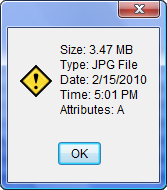
fmGetItemInfo "FileList1" "C:\Test\Photo1.jpg" "Size" "Formatted" "[Info1]" fmGetItemInfo "FileList1" "C:\Test\Photo1.jpg" "Type" "" "[Info2]" fmGetItemInfo "FileList1" "C:\Test\Photo1.jpg" "Date" "m/d/yyyy" "[Info3]" fmGetItemInfo "FileList1" "C:\Test\Photo1.jpg" "Time" "h:nn ampm" "[Info4]" fmGetItemInfo "FileList1" "C:\Test\Photo1.jpg" "Attributes" "" "[Info5]" AlertBox "" "Size: [Info1]|Type: [Info2]|Date: [Info3]|Time: [Info4]|Attributes: [Info5]"
|
Purpose: |
Set the date, time, attributes or permissions for a specific file or folder. (To modify multiple items at the same time use fmSetSelectedInfo.) |
||||||||||||||||||||||||||
Category: |
Advanced File Processing |
||||||||||||||||||||||||||
Syntax: |
fmSetItemInfo "connection id" "file" "info type" "date format" "new value" connection id The name assigned to the connection. The connection must have already been opened with fmConnectLocal or fmConnectRemote. file The name (including path) of the file or folder. Only one file name may be specified at a time. info type The type of information you want to set. Use one of the following types:
date format The formatting to be used when setting the item's date stamp. This is the format of the date passed in the value parameter. The date format may be one of the following:
This parameter is ignored when setting attributes or permissions. new value The new date/time or attributes/permissions to be applied to the item. The value depends of the info type selected above.
|
||||||||||||||||||||||||||
Example: |
fmSetItemInfo "FileList1" "C:\Test\Photo1.jpg" "DateTime" "m/d/yy" "1/15/2011 3:45pm" |
Purpose: |
Retrieve a thumbnail image for a specific file or folder and save the image to a file in PNG or BMP format. Thumbnails are generated by Windows and are not provided for all types of files. When thumbnails are not available, Windows usually substitutes the file's associated extra large icon. Thumbnails and extra large icons are only available for local files in Windows XP and higher. For older versions of Windows, or when viewing remote FTP sites, large icons will be substituted. |
Category: |
Advanced File Processing |
Syntax: |
fmGetItemThumbnail "connection id" "source file" "width" "height" "output file" connection id The name assigned to the connection containing the selected files or folders. The connection must have already been opened with fmConnectLocal or fmConnectRemote. source file The name (including path) of a local file or folder. Only one file name may be specified at a time. width The desired maximum width for the thumbnail image. height The desired maximum height for the thumbnail image. Note: The actual dimensions of the generated thumbnail image may be smaller than the width and height specified. The image will be scaled if the original is larger than the requested width and height. However, the image's original aspect ratio will be maintained. output file The name and location of the external file where the thumbnail file will be saved. The thumbnail can be saved in BMP or PNG format. To save the thumbnail in PNG format the output file must end with ".png". Using any other file extension will result in the thumbnail being saved in BMP format. If the output file already exists, it will be overwritten. |
Example: |
The following example generates and displays a thumbnail image for the currently selected file or folder. (The first line insures that only one item is selected): If "[FileList1.SelCount]" "=" "1" fmFileListToVar "FileList1" "FullPath=Yes;IncludeFiles=Yes; IncludeFolders=Yes;SelectedOnly=Yes" "[FName]" fmGetItemThumbnail "FileList1" "[FName]" "96" "96" "[PubDir]thumb.bmp" If "[FMFTP.Error]" "=" "" ImageWindow "Thumbnail" "-1" "-1" "[PubDir]Thumb.bmp" EndIf Else AlertBox "Error" "Make sure only one item is selected." EndIf |
Purpose: |
Display the standard Windows properties dialog for a local file or folder. Note: This action cannot be used for files or folders located on a remote/FTP connection. |
Category: |
Advanced File Processing |
Syntax: |
fmShowFilePropertiesDlg "file" file The name (including path) of a local file or folder. Only one file name may be specified at a time. |
Example: |
The following example displays the properties dialog for the currently selected file or folder. (The first line insures that only one item is selected): If "[FileList1.SelCount]" "=" "1" fmFileListToVar "FileList1" "FullPath=Yes;IncludeFiles=Yes; IncludeFolders=Yes;SelectedOnly=Yes" "[FName]" fmShowFilePropertiesDlg "[FName]" Else AlertBox "Error" "Make sure only one item is selected." EndIf |