Miscellaneous
Purpose: |
When Show Errors is turned on, any problems that occur while processing NeoFM/FTP actions will be displayed to the user in the form of error messages. When turned off no messages are displayed. When Show Errors is turned off, you can obtain the most recent error is by examining the global [FMFTP.Error] variable. Show Errors is set to on automatically when NeoFM/FTP is initialized. |
Category: |
Miscellaneous |
Syntax: |
fmShowErrors "status" status The status of the Show Errors feature. Use "Yes" to turn Show Errors on or "No" to turn it off. |
Example: |
When Show Errors is turned off you can check the global [FMFTP.Error] variable to detect important errors and respond if needed. For example: fmShowErrors "No" fmCreateFolder "Local1" "Backup" If "[FMFTP.Error]" ">" "" AlertBox "Sorry" "Unable to create folder." EndIf fmShowErrors "Yes" In addition to the normal error trapping provided by the [FMFTP.Error] variable, you can also create an error subroutine called FMFTP_Error to execute special actions whenever an error occurs. For example, the following subroutine beeps annoyingly whenever an FM/FTP error is detected: :FMFTP_Error PlayTone "440" Return You should avoid executing FM/FTP plug-in actions from within this subroutine! Doing so could cause your publication to become stuck in an endless loop. |
Purpose: |
Customize or translate strings used by File Browser, confirmation dialog boxes, progress bars and other NeoFM/FTP features. These settings affect all connections, even those that have not yet been opened. |
|||||||||||||||||||||||||||||||||||||||||||||||||||||||||||||||||||||||||||||||||||||||||||||||||||||||||||||||||||||||||||||||||
Category: |
Miscellaneous |
|||||||||||||||||||||||||||||||||||||||||||||||||||||||||||||||||||||||||||||||||||||||||||||||||||||||||||||||||||||||||||||||||
Syntax: |
fmTranslateStrings "strings" strings This is a compound parameter and can contain any combination of the following items:
Separate multiple items in a compound parameter with semicolons (;). Items that do not need to be translated can be omitted. |
|||||||||||||||||||||||||||||||||||||||||||||||||||||||||||||||||||||||||||||||||||||||||||||||||||||||||||||||||||||||||||||||||
Example: |
The following example will translate the strings used for the File Browser's header into Italian: fmTranslateStrings "Name=Nome;Size=Dimensione;Type=Tipo;Modified=Modifica;Attributes=Attributi" |
Purpose: |
Configure the global default options used for all drag and drop operations. |
||||||||||||
Category: |
Miscellaneous |
||||||||||||
Syntax: |
fmSetDragDropOptions "options" options This is a compound parameter and can contain any combination of the following items:
Separate multiple items in a compound parameter with semicolons (;). |
||||||||||||
Example: |
fmSetDragDropOptions "DefaultAction=Copy;GetConfirmation=Yes;ShowProgress=Yes" |
Purpose: |
Set the global delimiter to be used for all NeoFM/FTP actions that require one. The global delimiter is used to separate multiple items in variables. The default global delimiter is the semicolon (;) character. |
Category: |
Miscellaneous |
Syntax: |
fmSetDelimiter "delimiter" delimiter The delimiter character that will be used to separate multiple items in a variable. |
Example: |
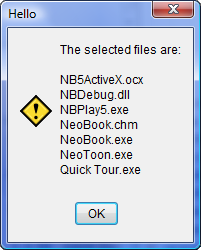
The following example sets the global delimiter to a carriage return, requests a list of selected files and displays the results in an AlertBox: fmSetDelimiter "[#13]" fmFileListToVar "FileList1" "FullPath=No;IncludeFiles=Yes;IncludeFolders=No; SelectedOnly=Yes" "[Files]" AlertBox "Hello" "The selected files are:||[Files]"
|
Purpose: |
Convert a numeric permission (CHMOD) to a permission string. For example, the numeric permission "755" would be converted to "rwxr-xr-x". This is primarily useful when getting or setting permissions for files and folders located on a remote/FTP server. |
Category: |
Miscellaneous |
Syntax: |
fmCHMODNumToPermStr "number" "variable" number The numeric permission to be converted. variable The name of the variable where the converted permission will be stored. |
Example: |
fmCHMODNumToPermStr "755" "[PermStr]" |
Purpose: |
Convert a permission string to a numeric permission (CHMOD). For example, the permission string "rwxr-xr-x" would be converted to "755". This is primarily useful when getting or setting permissions for files and folders located on an FTP server. |
Category: |
Miscellaneous |
Syntax: |
fmPermStrToCHMODNum "string" "variable" string The permission string to be converted. variable The name of the variable where the converted permission will be stored. |
Example: |
fmPermStrToCHMODNum "rwxr-xr-x" "[PermNum]" |
Purpose: |
Convert a file size number into a formatted string. The size will be formatted to include a thousands separator (if necessary) and reduced to the nearest gigabyte, megabyte, kilobyte or byte. For example:
|
||||||||||
Category: |
Miscellaneous |
||||||||||
Syntax: |
fmNumToSizeStr "size" "variable" size The file size number to be formatted. variable The name of the variable where the formatted file size will be stored. |
||||||||||
Example: |
fmNumToSizeStr "1024" "[SizeStr]" |